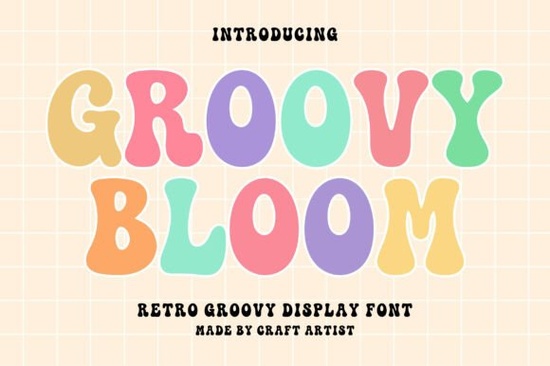
Finding the right typeface for a retro project can be tricky. You want something that screams 1970s without looking messy or hard to read. The Groovy Bloom Font fits this need perfectly. It offers bold curves and a playful vibe that works well for modern makers who love vintage aesthetics. Whether you are making custom apparel or branding a new coffee shop, this typeface brings a cheerful energy that standard fonts often lack.
What makes this font stand out for vintage designs?
This typeface is built with thick, rounded strokes that capture the essence of the 70s. Unlike standard serif or sans-serif options, it focuses on display use, meaning it shines in headlines rather than long paragraphs. The bold curves give it a soft feel, while the uppercase letters provide enough weight to stand out on a busy background. It includes full uppercase and lowercase sets, along with numbers and punctuation, so you can write complete sentences without switching fonts.
Multilingual support is another strong feature. You are not limited to basic English characters, which allows for broader use in international projects or designs that require special accents. The spacing between letters is generally well-balanced, reducing the need for manual kerning adjustments in your design software. This saves time when you are working on tight deadlines for clients or personal crafts.
Where can you use these letters in your projects?
The versatility of this style opens up many possibilities for creators. It is particularly effective for print-on-demand items where visual impact matters most. You can easily imagine this on t-shirts, mugs, and tote bags where a fun message needs to pop. Social media graphics also benefit from this look, as the bold shapes remain readable even on small mobile screens.
For those using cutting machines, this font works well with Cricut projects. The shapes are distinct enough to be cut from vinyl without losing detail. Logos and branding materials also benefit from the unique personality of the letters. If you are building a brand identity around nostalgia or fun, this typeface helps set that tone immediately. It pairs nicely with simpler sans-serif fonts for body text, creating a balanced hierarchy in your layouts.
How does it compare to other display styles?
There are many options in the vintage display category, and each has its own flavor. If you prefer something slightly more structured, you might explore styles like our look at the Imray style. For those who enjoy a softer, handwritten feel alongside their retro vibes, the Josie variant offers a different approach to display typography. Sometimes you need something that feels more urgent or bold, similar to what we saw with the Moment typeface in our previous comparisons.
If your project leans towards a specific American vintage theme, the Americlant range provides alternatives that focus on that patriotic aesthetic. Alternatively, if you need something with a heavier, blockier presence for signage or large prints, the Western Block options might suit your needs better. Groovy Bloom sits in the middle, offering playfulness without sacrificing readability, making it a safe choice for various creative tasks.
Is it suitable for beginners?
Yes, this font is very approachable for those new to design. You do not need advanced software skills to make it look good. Simply typing out your text usually yields a great result because the character shapes are designed to work well together. Most design programs like Canva, Adobe Illustrator, or Silhouette Studio support the file formats included. You will typically receive OTF or TTF files that install easily on both Windows and Mac systems.
Beginners should focus on pairing this display font with a simple secondary font. Avoid using it for long blocks of text, as the decorative curves can become tiring to read in large quantities. Instead, use it for titles, quotes, or short phrases. Experiment with color combinations that match the retro theme, such as mustard yellow, burnt orange, or teal. These colors enhance the vintage feel inherent in the letterforms.
Quick tips for getting started
To make the most of this typeface in your next project, keep these practical steps in mind. Proper preparation ensures your final design looks professional and ready for sale or sharing.
- Check licensing: Always review the license terms before using the font for commercial products like shirts or logos.
- Test readability: Print a sample or view your design at 100% zoom to ensure the curves remain clear.
- Pair wisely: Combine this font with a clean sans-serif for body text to maintain balance.
- Use high contrast: Ensure your text color stands out sharply against the background material.
- Save versions: Keep an editable version of your file in case you need to change the text later.
Start by downloading the file and installing it on your computer. Open your design software and type a few test words to see how the letters connect and flow. Once you are comfortable with the spacing, apply it to your main project file. This simple workflow helps avoid last-minute errors before you send your work to print.
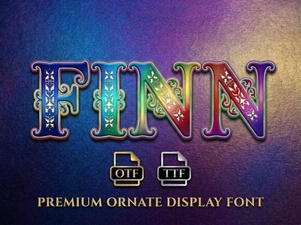 Finn Font: Typography for Craft & Creative Projects
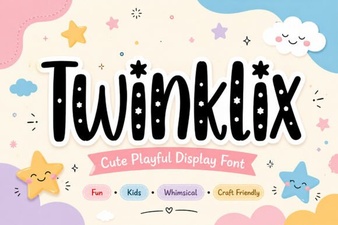 Discover the Twinklix Font for Creative Design Projects
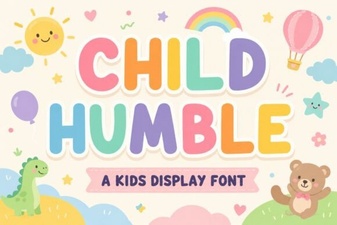 A Friendly Typeface for Children's Projects
 Cheerful Candies: a Playful Typography Guide
 Western Font Designs for Modern Creative Projects
 Initial Simple Font: Free Download and Design Ideas