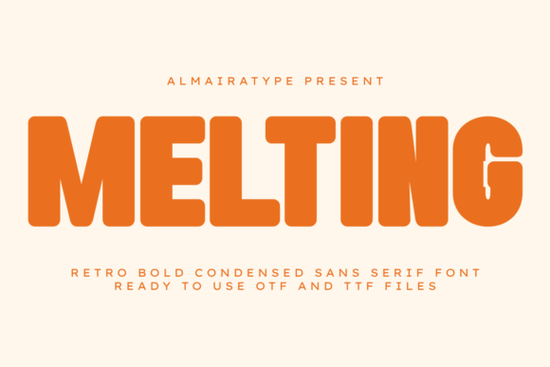
If you are searching for a typeface that captures the heavy, nostalgic vibe of the 1970s while remaining sharp enough for modern commercial use, the Melting Font is a strong contender. This bold, retro condensed sans-serif is built for impact. It features thick contours and a compressed structure that makes it ideal for headlines, logos, and apparel where you need the text to pop immediately.
Whether you are a graphic designer building a brand identity or a hobbyist making custom stickers, this font bridges the gap between vintage warmth and current design trends. It offers a distinct look that feels both classic and fresh, making it a versatile tool for your creative toolkit.
Why choose a condensed retro style for your projects?
Design trends cycle constantly, but the 70s aesthetic has stayed relevant because it feels authentic and warm. A font like Melting Font utilizes a robust anatomy that fills space efficiently. Unlike thin, delicate scripts that can get lost on a busy background, this typeface holds its ground.
The "melting" effect isn't just a gimmick; it adds a liquid, organic feel to the rigid structure of a sans-serif. This makes it perfect for:
- Streetwear brands: The heavy weight looks fantastic on t-shirts and hoodies.
- Summer campaigns: It evokes heat and energy, fitting for seasonal promotions.
- Packaging: It creates a bold label that stands out on a crowded shelf.
When you need maximum readability without sacrificing style, a condensed bold font is often the best choice. It allows you to fit larger text into tighter spaces without cramping the design.
Is it suitable for Print on Demand and crafting?
For Print on Demand (POD) entrepreneurs, legibility is key. When a customer sees a thumbnail of a t-shirt on a marketplace, they need to read the design instantly. The solid heavy contours of this font ensure that even at smaller sizes or from a distance, the message is clear.
For crafters using digital vinyl plotters, technical compatibility is just as important as style. This typeface comes with ultra-clean vector outlines. This means when you import it into software for machines like Cricut or Silhouette, you won't struggle with messy nodes or broken lines. It offers a flawless weeding experience, which saves you time and reduces material waste when cutting stickers, mugs, or heat transfer vinyl.
What other fonts pair well with this style?
While a bold display font is great for headlines, you often need supporting text that doesn't compete for attention. If you are building a full brand identity, you might want to pair this heavy style with something cleaner or more geometric.
For example, if you are designing a summer collection, you might look at the Spring Tumbler font to see if a slightly different sans-serif vibe complements your main header. Sometimes, mixing a heavy condensed font with a standard weight sans-serif creates a professional hierarchy that guides the reader's eye naturally.
If you prefer a more structured, studio-like feel for your body text, checking out options like the Studio Working font could provide that neutral balance you need. The goal is to let the main display font do the heavy lifting while the secondary font handles the details.
How does it compare to other modern sans-serifs?
There are many sans-serif options available, but few capture this specific retro-condensed mood. Some modern fonts are too geometric or cold. This typeface retains a human touch through its unique contours.
However, if you are looking for something with a bit more flair or a different kind of motion, you might also explore the Nova Moir font. Comparing different styles helps you understand exactly what your project needs. Do you need the solid blockiness of a retro font, or something more fluid? Understanding these nuances helps you build a better portfolio.
Ultimately, the Melting font stands out because it is specifically tuned for high-impact scenarios. It is not a subtle font, and that is its strength. It demands attention, which is exactly what you want for merchandise and branding.
Quick Checklist Before You Download
Before you add this to your cart, consider these practical steps to ensure it fits your workflow:
- Check your software: Ensure your design program supports OTF or TTF files (most do).
- Test the spacing: Condensed fonts sometimes need slight kerning adjustments when used at very large sizes.
- Plan your pairing: Decide now what body text font you will use so your design feels complete.
- Verify the license: Always read the specific license terms on the product page to confirm it covers your intended commercial use, such as POD or client work.
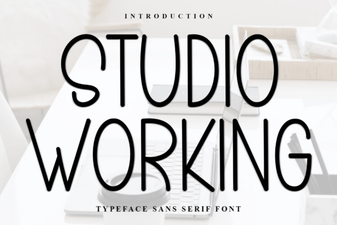 Fonts for Designers: the Studio Working Toolkit
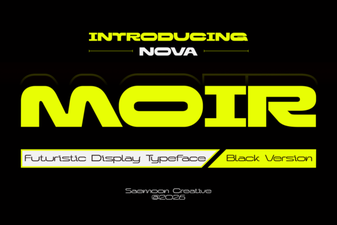 Nova Moir Font: Modern Headers & Creative Text Effects
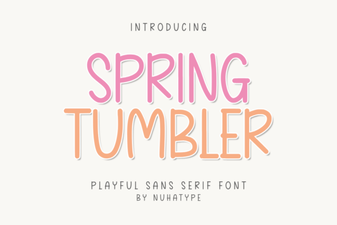 Creative Font Designs for Spring Tumblers
 Finn Font: Typography for Craft & Creative Projects
 Wildflower Infinity Font for Monogram Art Projects
 Discover the Twinklix Font for Creative Design Projects